


SkyView® Lite
4.35.19K Reviews
App Specs
- Version
- 3.9.2
- Updated On
- License
- Free
- Downloads
- 10,000,000+
- Developer
- Terminal Eleven LLC
- Categories
- Education
- Platform
- Android, iOS
Screenshots
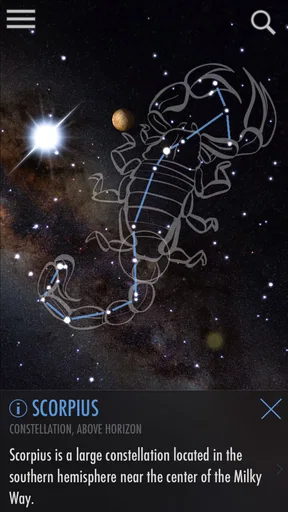
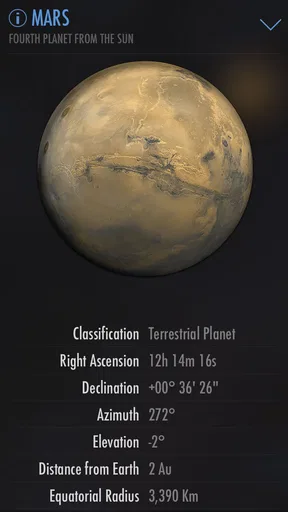
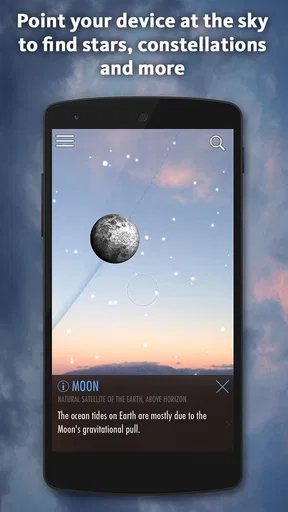
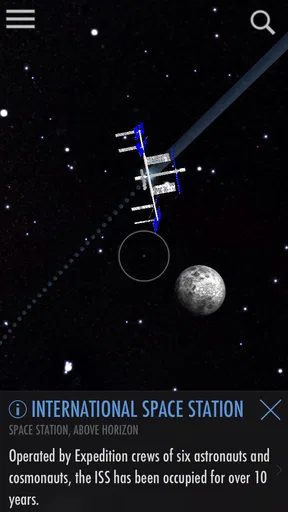
 Analysis by AppCompare
I tend to enjoy stargazing more when I can connect the bright dots overhead to actual names and patterns. SkyView® Lite is useful for that kind of casual curiosity: rather than asking you to begin with a chart or a lesson, it lets you explore the sky by pointing your phone upward. That immediate, visual approach makes it easier to start, though it works best as a guide for looking around rather than a replacement for learning the night sky in depth.
Free access makes the first look easy
The app is free, which makes it straightforward to try on an impulse before heading outside. It comes from Terminal Eleven LLC and sits in the education category, but its appeal is not limited to students: anyone who has paused to wonder what a bright point of light might be can find a reason to open it. The audience rating is Everyone, so it can also be a friendly starting point for families exploring together.
There is a paid version with more features, but I would judge the free edition on what it lets you do before thinking about an upgrade. I would not treat the existence of a premium option as a reason to expect a particular feature to be included or to assume that paying is necessary. The practical question is whether the free experience answers the questions you actually have when you look up.
A pocket guide, not a substitute for the sky
The main value is the direct connection between the phone’s view and the objects represented on screen. Instead of trying to match a printed chart to the direction you are facing, you can use the overlay to get oriented, then look back up and try to recognize the pattern without the display. That second step matters: it turns a quick identification into a small learning exercise rather than leaving you dependent on the screen.
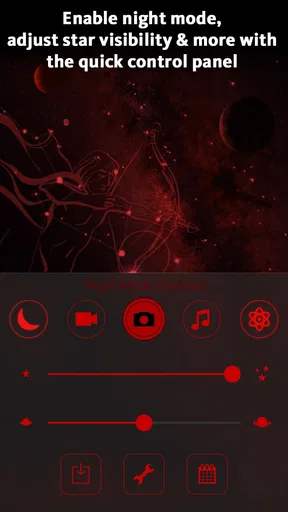
For a first outing, I would pick one visible target and follow the app’s labels and surrounding constellation lines, rather than trying to identify everything at once. Once you have a few reference points, the sky feels less like a scattered collection of lights. Night mode is especially relevant here because a bright screen can interfere with dark-adapted vision; using the darker display is a sensible habit when you are trying to see faint stars around a brighter object.
Where patience helps
Pointing a phone at the sky sounds effortless, but an augmented-reality view is only as useful as the alignment between the display and what you are seeing. If the overlay does not appear to match the sky, I would pause, steady the phone, and reorient it rather than treating the first view as definitive. A handheld screen can also make it tempting to spend the whole evening looking down. I get more from the app when I use it briefly to identify a target, then lower the phone and observe directly.
It is also worth keeping expectations grounded. A sky-identification app can help explain what is overhead, but it cannot make a cloudy evening clear or turn a bright, light-filled location into a dark-sky site. For detailed observing plans, equipment guidance, or a structured astronomy course, a dedicated chart, telescope resource, or learning app may be a better fit. SkyView® Lite is most convincing when the goal is quick orientation and an engaging first step.
Worth Reading Before You Choose

EA SPORTS FC Mobile 26 Is a Bigger Football Game, but It Takes Time

Flipboard Shows What News Apps Must Do Beyond the Feed

Switching to Android Auto Means Rethinking Your Driving Routine

Google Calendar Makes a Crowded Week Easier to Manage

Ludo King Makes the Most of the Minutes Between Plans

Baby Panda World Brings Quick Play to Modern Phones, but Its Game Library Feels Busy
For families, beginners, and curious passersby
A realistic use is a clear evening when someone asks whether a bright point is a planet or a star. I would open the app, point toward it, and use the result as a prompt for a short conversation: what else is nearby, which pattern can we trace, and can we find the same target again without the phone? That works well with children because it gives them something concrete to investigate, while leaving room for questions rather than turning the moment into a lecture.
It can also help an adult who wants a low-effort outdoor activity but does not want to study a chart beforehand. The time-travel option offers a different way in: comparing the sky on another date can make astronomy feel connected to a birthday or a historical moment, rather than only to what is visible right now. I would use that as a conversation starter, not as a substitute for checking what can actually be seen on the current night.
How it differs from charts and astronomy lessons
Compared with a paper sky chart, the app has the advantage of showing a guided overlay in the direction you are facing; a chart, in turn, encourages you to orient yourself and can be easier to consult without holding a glowing phone. Compared with a course or reference-heavy astronomy app, SkyView® Lite is less about a planned sequence of learning and more about answering a question in the moment. That makes it inviting for beginners, but less suited to someone who wants systematic lessons or deeper observing advice.
One useful compromise is to use both styles of learning: identify a constellation with the phone, then try to sketch its shape or find it again later without assistance. This helps reveal what you have actually learned. If you are planning a serious observing session, a chart and a darker environment may serve you better; if you are simply curious about the object above the roofline, the live overlay is the quicker route.
What the app’s scale says—and what it does not
SkyView® Lite has an average rating of 4.3 from around 58,000 ratings, and it has passed 10 million installs. Those figures suggest that its simple, visual approach has reached a broad audience, but popularity does not guarantee that every screen will suit every observer. I would use the app’s straightforward purpose, rather than its reach, to decide whether it fits: it is made for accessible sky exploration, not for replacing specialist tools.
It was released in 2014, and version 3.9.2 is listed for devices running at least OS 10. The review count is around 5,200, another sign that people have spent time with it, but the most useful test is still a practical one: try it outdoors, check whether the overlay helps you orient yourself, and see if you enjoy learning this way. Since it costs nothing to start, that is a reasonable experiment for a curious beginner.
Ever found yourself gazing up at the night sky, wondering about the stars and planets above you? Well, let me tell you about this app called SkyView® Lite. It’s like having a personal pocket-sized astronomer, and trust me, it’s pretty awesome.
Discovering the Universe from Your Backyard
Let’s dive right in! SkyView® Lite is an app that takes your stargazing experience to a whole new level. Whether you're an astro-geek or just someone who enjoys the occasional shooting star, this app has something for everyone.
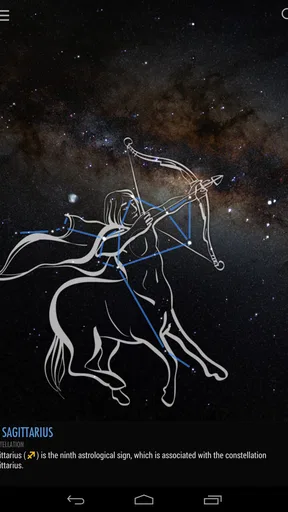
First things first, the app is super easy to navigate. Once you open it, you’re greeted with a simple interface that’s not cluttered. I love the fact that it doesn’t overwhelm you with options or ads. It’s just you and the sky. You can simply point your phone upwards, and the app will overlay the constellations and planets on your screen. It’s like augmented reality meets stargazing, and it’s seriously cool.
The Features That Shine
What really stands out about SkyView® Lite is its ability to identify celestial bodies in real-time. I was amazed at how accurate it was. From identifying Saturn to showing me where the International Space Station is, it felt like I had a mini space station control room in my hand.
Another feature that had me hooked is the time travel option. You can literally go back in time to see the sky on any date. Want to see what the sky looked like on your birthday? Easy. Curious about the night sky during historical events? No problem. It’s fascinating and makes for a great conversation starter at parties.
The app also offers night mode, which is perfect for keeping your eyes adjusted to the dark while you’re out stargazing. This is a thoughtful touch, especially if you’re serious about your starry explorations.
Why It’s a Must-Have
Now, I know what you might be thinking. "Isn’t this just another app that’ll sit on my phone and never be used?" Well, not quite. What makes SkyView® Lite different is how it brings the wonders of the universe to you in a way that’s engaging and educational. It’s not just about staring at stars; it’s about understanding them.
For parents, it’s a great educational tool. Kids can learn about constellations, planets, and space missions in an interactive way. Plus, it’s free! You can’t beat that. Of course, there’s a premium version with more features, but the free version offers plenty to explore.
Wrapping It Up
So, there you have it. SkyView® Lite is one of those apps that you might not have known you needed until you tried it. It’s educational, fun, and a fantastic way to spend a clear night. Whether you’re an astronomy enthusiast or just someone who thinks the universe is pretty neat, give it a shot.
Grab your phone, download the app, and step outside. Who knows? Tonight might just be the night you discover something extraordinary. Happy stargazing!
Pros
- Easy to use with intuitive controls.
- Accurate identification of stars and planets.
- No internet connection needed.
- Engaging educational tool for all ages.
- Free version offers plenty of features.
Cons
- Limited features compared to the paid version.
- Ads can interrupt the experience.
- Requires access to device location.
- Not all celestial objects are available.
- Interface may lag on older devices.
FAQs for SkyView® Lite
What features does SkyView® Lite offer for stargazing enthusiasts?
SkyView® Lite provides a comprehensive stargazing experience with features like augmented reality, allowing users to point their device at the sky and identify stars, constellations, and satellites. The app includes night mode for reduced glare, time travel to view the sky at different times and dates, and detailed information about celestial objects.
Is SkyView® Lite suitable for beginners in astronomy?
Absolutely! SkyView® Lite is designed with beginners in mind, offering an intuitive interface and easy-to-understand tutorials. The app provides detailed explanations and visuals to help users learn about celestial bodies, making it an excellent starting point for those new to stargazing and astronomy.
Does SkyView® Lite require an internet connection to function?
No, SkyView® Lite does not require an internet connection to operate. Once downloaded, the app uses your device’s sensors and GPS to display the sky map. This offline functionality makes it perfect for use in remote areas where internet access may be unavailable.
Are there any in-app purchases or ads in SkyView® Lite?
SkyView® Lite is a free version of the SkyView app and includes ads. While it provides a robust set of features, users may encounter advertisements. For those seeking an ad-free experience with additional features, the full version, SkyView®, is available for purchase.
How accurate is SkyView® Lite in identifying stars and constellations?
SkyView® Lite is highly accurate in identifying celestial objects, thanks to its use of GPS and augmented reality. However, accuracy can be affected by your device's sensors and environmental conditions. For best results, calibrate your device's compass and ensure clear skies when using the app.


